Physical power-switch identity
The operator reported on 2026-09-27 that tapping the lower physical button immediately resets the booted NixOS system. This is a user observation of a reset, not proof of which circuit the switch closes. The switch label and position relative to the board’s PMU power key and hardware RESET switch have not yet been recorded from the operator’s board markings.
The vendor’s T-Display K230 pin map labels the lowest right-edge button beside the Ethernet jack Reset Key. It labels INT0 above the BOOT0 switch near the Wi-Fi module. If the operator’s “bottom button” is that lowest right-edge button, the instant restart is the expected electrical reset. This placement match is an inference from the vendor image and the operator’s description.
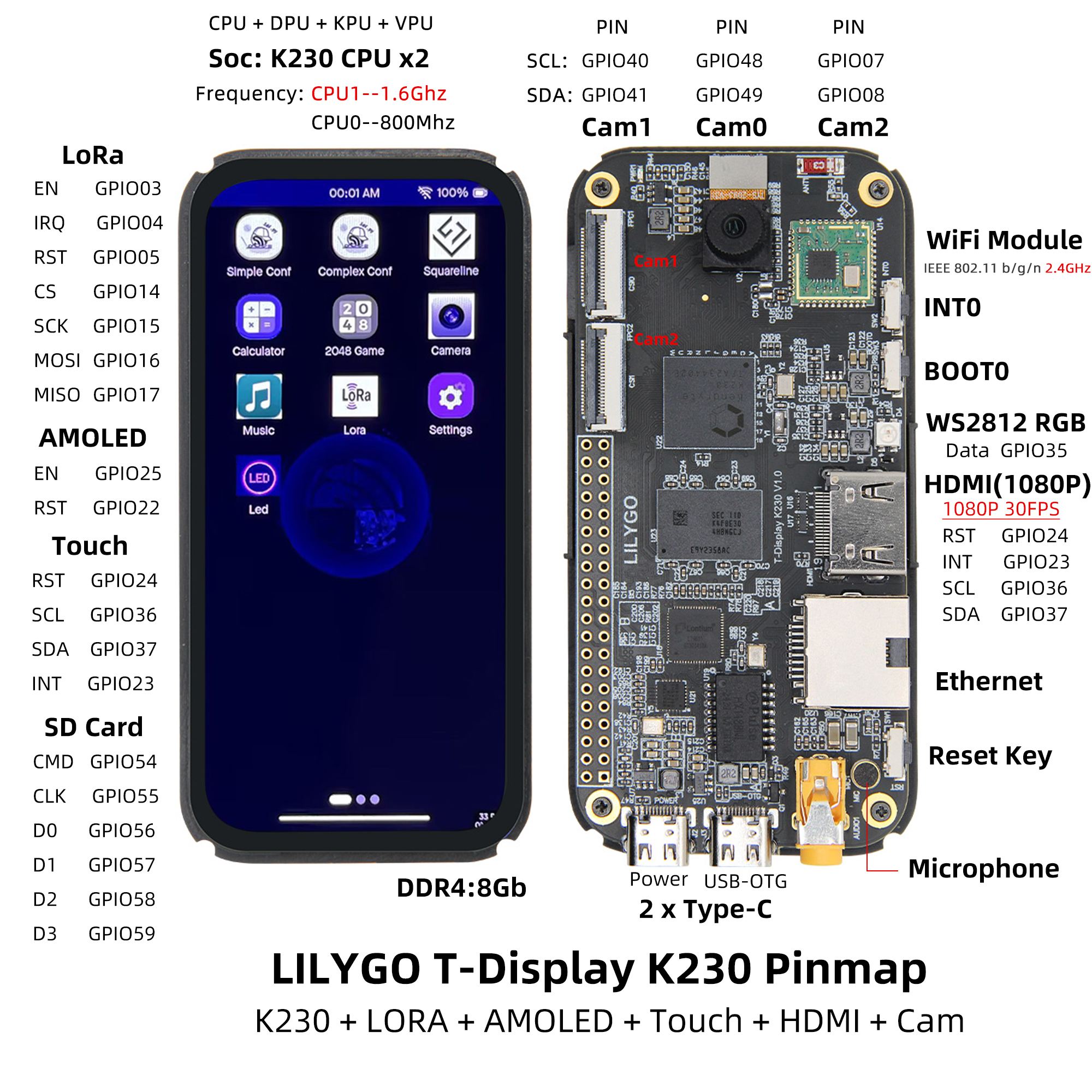
The LILYGO T-Display K230 V1.0 schematic,
page 6 (“Peripheral”), shows three separate switches: SW1 joins
RSTN to ground, SW2 joins PMU INT0 to VDD_1V8_RTC, and SW3
joins BOOT0 to ground. SW1 is an electrical reset and cannot become a Linux
display-control key; SW2 is the candidate for that behavior. The pin map
supplies the physical placement absent from the schematic.
The LILYGO K230 BSP
lists PMU power-key input support. Its PMU power-key driver patch
adds a canaan,k230-pmu-pwrkey input node at 0x91000000, CPU interrupt
175 and Linux KEY_POWER. The repository’s board capability inventory
records the vendor pin claim that PMU INT0 is GPIO64 and is not an ordinary
GPIO line. These sources ground the candidate software path for INT0.
UNVERIFIED: No physical INT0 key event was captured, and the physical board marking has not been checked. The candidate PMU kernel cannot change SW1’s reset behavior or serve as evidence that the bottom-button reset was fixed. The intended software control is the separate INT0 button.
Operator identification, 2026-10-14
On the landscape image, with the board in the keyboard case and the keyboard
toward the operator, the button the operator pressed is at the top right.
Each press logged k230-pmu-pwrkey 91000000.pmu-pwrkey: INT0 press and
INT0 release in the kernel journal, and arrived as KEY_POWER on the input
device named “K230 PMU Power Key” (/devices/platform/soc/91000000.pmu-pwrkey).
The board did not reset (boot ID unchanged; see ../mainline-events/). So the
top-right button is SW2, PMU INT0, the switch Linux can intercept. SW1 (RSTN)
was not pressed.