Installed and verified
Room for apps and updates
The system expanded its compact root filesystem on the physical 128 GB card, leaving about 119 GB free. A second boot preserved the capacity, boot files, shell and Wi-Fi.
Storage evidenceLILYGO T-Display-K230 · specification ledger
On this board the documentation and the hardware disagree routinely. A datasheet described a working radio whose enable line is never driven. So a requirement counts as grounded only when something was observed on the board, or vendor source was read and cited by path — never because a datasheet says so.
Progress · September 23, 2026
Installed and verified
The system expanded its compact root filesystem on the physical 128 GB card, leaving about 119 GB free. A second boot preserved the capacity, boot files, shell and Wi-Fi.
Storage evidenceExperimental shell · measured on board
A new profile attributes about 98% of repaint CPU to constructing and painting frames. After correcting a test setup race, all 13 injected interaction checks passed again. A scaled-pixel cache passed interaction checks but increased CPU cost in its board comparison, so it stays disabled. Performance and real-finger acceptance remain open.
Repaint profile and remaining performance gates Corrected test and board repeat Cache comparison and decisionExperiment complete
Vector state and 192 pixel comparisons passed. Card performance gains were small and mixed. Work is underway to bring the proven vector path into the normal image; the candidate still needs its own boot and recovery checks.
Measured decisionNext: reduce card repaint cost, verify the feel with a finger, and refine the shell, launcher, settings and notifications into a coherent webOS-inspired interface. That interface is still in development. Try the gesture and motion study · See the proposed screens · Read the design overview.
The requirement count tracks archived specifications. This progress summary and the feature demonstrations also report verified work in changes that remain open. Landing a proposal does not make it an installed feature.
project work · dated snapshot
The public work board separates planned changes, implementation, review and evidence gates, and archived work. It shows task counts and distinguishes landed source from device proof.
handheld shell · 2026-09-22
A portrait NixOS session with an on-screen keyboard, desktop application launcher, window controls and system actions. Real-touch recordings now show typing, application interaction and a reboot back into the shell. Home recovery is confirmed by the operator. The shell and launcher are archived, with the remaining drag verification gap visible in the ledger.
the screen · 2026-09-21
The AMOLED emits under Linux, the kernel console renders on the glass at
71×77 characters, and the GT9895 delivers multitouch to
/dev/input/event0. Both faults were the same shape: a driver
that reported itself healthy while producing nothing. The panel had been
sent a different panel’s initialisation sequence —
correctly transcribed, from a function with no callers — and never
told to leave zero brightness. The touch controller had its interrupt
declared edge‑triggered on a part that holds the line low until it
is acknowledged: 0 interrupts against 2173.
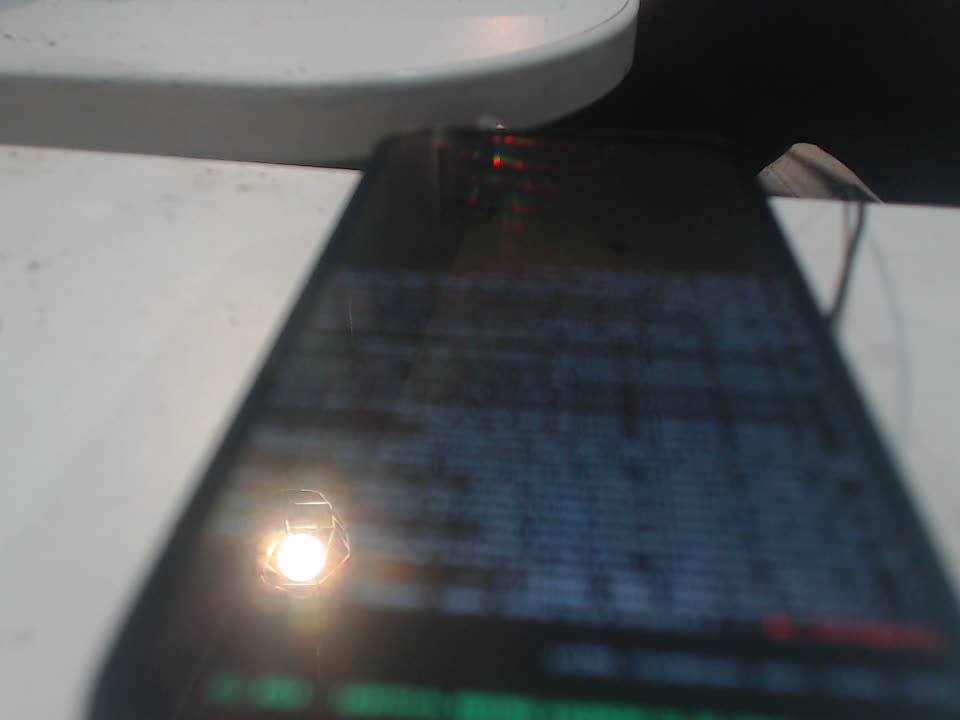
docs/evidence/panel-photos/05-console-on-panel.jpg —
photographed off the board, not rendered. Five more photographs are
committed beside it.
IRQ_TYPE_EDGE_FALLING to IRQ_TYPE_LEVEL_LOW.
first boot · 2026-09-20
Not under emulation, not on the build host. A kernel this repository
cross-compiled, an image this repository wrote, an SD card in the board
— and a prompt on /dev/ttyACM0 that answered four
questions no x86 machine and no qemu-system-riscv64 -machine virt
could have answered the same way.
[root@nixos:~]# cat /proc/cpuinfo
processor	: 0
hart		: 0
isa		: rv64imafdcv_zicbom_zicboz_zicntr_zicsr_zifencei_zihpm_zba_zbb_zbs_svpbmt
mmu		: sv39
uarch		: thead,c908
mvendorid	: 0x5b7
marchid		: 0x8000000009140d00
mimpid		: 0x50000

[root@nixos:~]# uname -a
Linux nixos 6.6.36 #1-NixOS SMP Tue Jan  1 00:00:00 UTC 1980 riscv64 GNU/Linux

[root@nixos:~]# cat /proc/cmdline
console=ttyS0,115200n8 root=fstab loglevel=4 lsm=landlock,yama,bpf init=/nix/store/2h0xrlf5n74fjjhxqd18y6vl55w4zyrr-nixos-system-nixos-26.11.20260919.20b1ddd/init

[root@nixos:~]# findmnt -no SOURCE,FSTYPE /
/dev/mmcblk1p2 ext4

[root@nixos:~]# nproc
1
virt.
/proc/cmdline is exactly the string the SD image writes
to bootargs.txt. Making that true took a fix in the
U‑Boot environment.
root=, yet / is
/dev/mmcblk1p2. The NIXOS_SD label path had
never been exercised before; it works.
Hand-authored rather than rendered from the specs, and maintained here rather than anywhere else. They are split by where their facts came from, because that is what decides how much they are worth: a note written from a console transcript outranks a note written from a device tree, and both get corrected in place when the repository learns something newer.
Written from console transcripts. The board did these things and they were captured.
Written from the device trees, the schematic and the vendor BSP. Correct descriptions of source, which is not the same as working hardware.
Committed in the repository and rendered here in full, so a boot log or a photograph is readable without a checkout. An observation on the board outranks vendor source; a datasheet grounds nothing. The two lists are kept apart because they carry different weight.
docs/blob-inventory.md 362.1 KiB docs/design/app-drawer-review.md 20.0 KiB docs/design/clock-widget-research.md 13.6 KiB docs/design/shell-polish-review-2026-09.md 32.9 KiB docs/design/shell-ux-critique-switcher.svg 6.1 KiB docs/design/shell-ux-critique.md 46.0 KiB docs/display-environment-options.md 27.7 KiB docs/dts-evidence.md 10.7 KiB docs/evidence/app-drawer/system-keyboard-board/README.md 3.6 KiB docs/evidence/backlight/board-findings.md 6.9 KiB docs/evidence/backlight/live-hs/README.md 3.5 KiB docs/evidence/battery-details-widget/board/README.md 1.9 KiB docs/evidence/battery-details-widget/history/README.md 1.3 KiB docs/evidence/battery-details-widget/history/board/README.md 1.6 KiB docs/evidence/battery-details-widget/host/README.md 1.8 KiB docs/evidence/big-buck-bunny/README.md 3.8 KiB docs/evidence/blob-scan.txt 6.3 KiB docs/evidence/boot-from-source-cold.txt 53.7 KiB docs/evidence/boot-path-differences.md 7.1 KiB docs/evidence/boot-splash-owner.md 6.2 KiB docs/evidence/boot-verification/2026-10-01/README.md 6.6 KiB docs/evidence/boot-verification/coherent-bundle-host/README.md 2.2 KiB docs/evidence/boot-verification/coherent-ordinary-boot/README.md 6.1 KiB docs/evidence/boot-verification/coherent-ordinary-boot/operator-navigation.json 1.3 KiB docs/evidence/card-composition-board/README.md 7.2 KiB docs/evidence/card-shell/android-sized-cards/README.md 7.4 KiB docs/evidence/card-shell/board-cost/long-trace/README.md 3.1 KiB docs/evidence/card-shell/frame-budget/acceptance-2026-10-09/README.md 5.0 KiB docs/evidence/card-shell/frame-budget/board-result-2026-09-28.md 1.6 KiB docs/evidence/card-shell/injected/README.md 5.9 KiB docs/evidence/card-shell/kernel-rvv/board-trial/README.md 8.4 KiB docs/evidence/card-shell/kernel-rvv/board-trial/boot1-selected.log 0.9 KiB docs/evidence/card-shell/kernel-rvv/board-trial/boot1.json 1.1 KiB docs/evidence/card-shell/kernel-rvv/board-trial/vector-state1.json 2.0 KiB docs/evidence/card-shell/kernel-rvv/card-cost/README.md 9.5 KiB docs/evidence/card-shell/kernel-rvv/context-probe/board-skip.json 0.5 KiB docs/evidence/card-shell/live-card-cost/README.md 5.9 KiB docs/evidence/card-shell/overview-home-bleed-through/README.md 9.7 KiB docs/evidence/card-shell/overview-home-bleed-through/board-2026-09-30/README.md 2.2 KiB docs/evidence/card-shell/pixman-rvv/kernel-probe.json 0.1 KiB docs/evidence/card-shell/pixman-rvv/pixel-trial/README.md 6.3 KiB docs/evidence/card-shell/pixman-rvv/pixel-trial/board/result.json 212.6 KiB docs/evidence/card-shell/transparent-corners/README.md 7.1 KiB docs/evidence/chicago-clock/runtime.json 0.9 KiB docs/evidence/coherent-shell/accessibility-scale/README.md 14.1 KiB docs/evidence/coherent-shell/accessibility-scale/board/11-panel-drawer.png 108.0 KiB docs/evidence/coherent-shell/combined-board-candidate-2026-10-10/README.md 17.5 KiB docs/evidence/coherent-shell/operator-closeout-2026-10-10/README.md 6.2 KiB docs/evidence/coherent-shell/shade-quick-toggles/README.md 4.3 KiB docs/evidence/console/ssh-installed-2026-10-11/README.md 3.7 KiB docs/evidence/cpu-extensions/README.md 7.9 KiB docs/evidence/cpu-extensions/installed-mainline-2026-10-11/README.md 7.8 KiB docs/evidence/cross-build.txt 6.9 KiB docs/evidence/display-touch/trackpad-restart-and-long-press/README.md 2.2 KiB docs/evidence/drm-info.txt 23.3 KiB docs/evidence/dsi-burst-headroom.md 4.5 KiB docs/evidence/dsi-hsfreqrange-hardcoded.md 10.8 KiB docs/evidence/dsi-phy-hang.md 18.2 KiB docs/evidence/fahrenheit-weather/README.md 1.3 KiB docs/evidence/files-app/board-2026-09-30/README.md 4.5 KiB docs/evidence/final-shell-image/README.md 4.6 KiB docs/evidence/flicker-after-headroom-revert.md 6.5 KiB docs/evidence/gpu-validation/README.md 4.9 KiB docs/evidence/gpu-validation/cpu-timing-pass.txt 6.1 KiB docs/evidence/gpu-validation/initial-format-failure.txt 3.1 KiB docs/evidence/gt9895-touch.md 4.2 KiB docs/evidence/gzip-equivalence.txt 3.8 KiB docs/evidence/hardware-boot.txt 0.6 KiB docs/evidence/hardware-userspace.md 3.9 KiB docs/evidence/hdmi-hotplug/landscape/teardown-crash.md 6.2 KiB docs/evidence/hdmi-hotplug/live-switch/closeout-2026-10-09.md 3.8 KiB docs/evidence/hdmi-hotplug/live-switch/fast-runtime-operator-report.json 1.3 KiB docs/evidence/hdmi-hotplug/live-switch/fast-runtime-qualification.json 1.0 KiB docs/evidence/hdmi-hotplug/live-switch/normal-hotplug-install-serial.json 6.6 KiB docs/evidence/hdmi-hotplug/live-switch/normal-hotplug-runtime-state.json 2.2 KiB docs/evidence/hdmi-hotplug/probe/lt9611-probe-2026-09-29.md 3.0 KiB docs/evidence/hdmi-mainline/README.md 14.6 KiB docs/evidence/hdmi-plug-cma/board-2026-10-16.md 5.2 KiB docs/evidence/home-screen/app-actions/board/full-system/actions-result.json 0.6 KiB docs/evidence/home-screen/closeout-2026-10-09.md 3.6 KiB docs/evidence/home-screen/navigation/README.md 6.2 KiB docs/evidence/home-screen/navigation/operator-acceptance-2026-10-01.md 1.0 KiB docs/evidence/home-screen/operator-trackpad-2026-10-15.md 1.8 KiB docs/evidence/home-screen/page-settle/README.md 1.7 KiB docs/evidence/home-screen/real-touch/operator-report-2026-10-08.md 1.3 KiB docs/evidence/home-screen/widget-hit-area/README.md 1.1 KiB docs/evidence/home-screen/widget-picker-fit/README.md 2.6 KiB docs/evidence/home-screen/widget-picker-fit/board/before-widget-rows-past-the-card-1280x800-grim.png 144.4 KiB docs/evidence/home-screen/widget-right-click/README.md 1.5 KiB docs/evidence/home-widget-design/closeout-2026-10-01/board/README.md 2.0 KiB docs/evidence/home-widgets-folders/closeout-2026-10-01/board/README.md 2.0 KiB docs/evidence/image-releases/2026-10-01/README.md 7.5 KiB docs/evidence/kernel-patches.md 16.4 KiB docs/evidence/keyboard-base/charger/README.md 6.6 KiB docs/evidence/keyboard-base/charger/registers-bound-2026-10-14.log 0.5 KiB docs/evidence/keyboard-base/keys/README.md 3.8 KiB docs/evidence/launcher-curation/host.md 3.0 KiB docs/evidence/launcher-curation/operator-board-2026-10-08.md 1.8 KiB docs/evidence/launcher-gestures/integrated-injected/README.md 4.5 KiB docs/evidence/launcher-gestures/real-finger/README.md 2.6 KiB docs/evidence/lilygo-uboot-logo.md 43.1 KiB docs/evidence/mainline-default-boot/README.md 5.8 KiB docs/evidence/mainline-default-boot/first-install-journal.json 3.7 KiB docs/evidence/mainline-default-boot/postboot.json 2.3 KiB docs/evidence/mainline-display-api-compile.md 3.0 KiB docs/evidence/mainline-display-boot-preparation.md 8.0 KiB docs/evidence/mainline-display-dtb.md 3.4 KiB docs/evidence/mainline-display-nix-build.md 2.6 KiB docs/evidence/mainline-display-power-domain.md 5.8 KiB docs/evidence/mainline-display/physical-2026-10-01/README.md 6.6 KiB docs/evidence/mainline-display/physical-2026-10-01/mainline-restart-source-audit-2026-10-02.md 5.7 KiB docs/evidence/mainline-display/physical-2026-10-01/power-swap-recovery-2026-10-02/README.md 3.2 KiB docs/evidence/mainline-init-exec-return/actual-host/README.md 6.2 KiB docs/evidence/mainline-init-exec-return/host/README.md 5.9 KiB docs/evidence/mainline-init-exec-return/physical-2026-10-05/README.md 3.0 KiB docs/evidence/mainline-init-exec-return/physical-2026-10-05/publication.json 0.8 KiB docs/evidence/mainline-init-exec-return/physical-2026-10-05/recovery.json 1.7 KiB docs/evidence/mainline-init-exec-return/restoration-host/README.md 4.5 KiB docs/evidence/mainline-init-exec-transition/controller/README.md 5.6 KiB docs/evidence/mainline-init-exec-transition/source/README.md 5.1 KiB docs/evidence/mainline-init-exec-transition/source/identity-evaluation.json 13.2 KiB docs/evidence/mainline-initrd-debug-logging/host/README.md 2.3 KiB docs/evidence/mainline-initrd-debug-logging/physical-2026-10-05/README.md 2.9 KiB docs/evidence/mainline-initrd-info-kmsg-logging/host/README.md 2.3 KiB docs/evidence/mainline-initrd-info-kmsg-logging/physical-2026-10-05/README.md 3.2 KiB docs/evidence/mainline-initrd-info-kmsg-logging/physical-2026-10-05/recovery.json 1.7 KiB docs/evidence/mainline-initrd-info-logging/host/README.md 2.5 KiB docs/evidence/mainline-initrd-info-logging/physical-2026-10-05/README.md 3.1 KiB docs/evidence/mainline-restart/README.md 17.3 KiB docs/evidence/mainline-restart/physical-clock-comparison-2026-10-02/README.md 3.8 KiB docs/evidence/mainline-sd-image/README.md 2.1 KiB docs/evidence/mainline-sd-image/host-inspection.json 2.0 KiB docs/evidence/mainline-sd-throughput/README.md 4.1 KiB docs/evidence/mainline-sd1-clocks/physical-no-flag-2026-10-03/README.md 7.1 KiB docs/evidence/mainline-shell-parity-2026-10-06/README.md 2.9 KiB docs/evidence/mainline-system-trial/current-p2-baseline-repeat-host-2026-10-05/README.md 2.4 KiB docs/evidence/mainline-system-trial/current-p2-baseline-repeat-physical-2026-10-05/README.md 3.6 KiB docs/evidence/mainline-system-trial/current-p2-baseline-repeat-physical-2026-10-05/recovery.json 1.6 KiB docs/evidence/mainline-system-trial/current-p2-ordinary-physical-2026-10-05/README.md 3.2 KiB docs/evidence/mainline-system-trial/shell-pid1-physical-2026-10-03/README.md 4.7 KiB docs/evidence/mainline-uart-progress-breadcrumbs/physical-2026-10-03/README.md 5.5 KiB docs/evidence/mainline-uart-progress-breadcrumbs/physical-2026-10-03/result.json 3.2 KiB docs/evidence/mainline-uart-progress-memory-printk/nohz-off-physical-2026-10-04/README.md 3.3 KiB docs/evidence/mainline-uart-progress-memory-printk/physical-2026-10-04/README.md 3.6 KiB docs/evidence/mainline-uart-progress-memory/no-stimulus-physical-2026-10-04/README.md 3.3 KiB docs/evidence/mainline-uart-progress-memory/physical-2026-10-03/README.md 4.0 KiB docs/evidence/mainline-uart-progress-memory/poll-idle-physical-2026-10-04/README.md 3.1 KiB docs/evidence/mainline-uart-progress-post-sample/physical-2026-10-03/README.md 4.7 KiB docs/evidence/mainline-uart-progress/exact-full-host-2026-10-03.md 5.7 KiB docs/evidence/mainline-uart-progress/physical-2026-10-03/README.md 3.9 KiB docs/evidence/network-video/README.md 5.2 KiB docs/evidence/network-video/installed-controls/README.md 1.9 KiB docs/evidence/network-video/integration-host.md 3.3 KiB docs/evidence/network-video/midstream-error/README.md 2.8 KiB docs/evidence/network-video/recovery-fixed/README.md 1.8 KiB docs/evidence/network-video/strict-comparison/README.md 4.4 KiB docs/evidence/offline-app-candidates/selection.md 2.2 KiB docs/evidence/offline-help-injected/README.md 3.4 KiB docs/evidence/offline-wifi-image/README.md 8.2 KiB docs/evidence/offline-wifi-image/final-readiness.txt 1.2 KiB docs/evidence/offline-wifi-image/final-wifi-network.txt 0.2 KiB docs/evidence/omarchy-themes/accepted-closeout-2026-10-10/README.md 6.6 KiB docs/evidence/omarchy-themes/background-decode-cache-qemu/README.md 14.0 KiB docs/evidence/omarchy-themes/compatibility-closeout-2026-10-10.md 8.5 KiB docs/evidence/omarchy-themes/consumer-closeout-2026-10-10/README.md 6.7 KiB docs/evidence/omarchy-themes/installed-consumers-2026-10-10/README.md 8.3 KiB docs/evidence/omarchy-themes/settings-notifications-themed/board/README.md 4.7 KiB docs/evidence/omarchy-themes/theme-swap-jank/README.md 7.4 KiB docs/evidence/omawrite/README.md 8.5 KiB docs/evidence/omawrite/board/boot-result.json 0.6 KiB docs/evidence/omawrite/board/result.json 1.3 KiB docs/evidence/opensbi-fdt-lands-in-kernel-image.md 3.5 KiB docs/evidence/opensbi-fdt-passthrough.txt 4.0 KiB docs/evidence/panel-lit.md 3.9 KiB docs/evidence/panel-photos/05-console-on-panel.jpg 26.0 KiB docs/evidence/panel-probe.txt 9.3 KiB docs/evidence/power-key/hdmi-unplug-wake/board-2026-10-16.md 3.5 KiB docs/evidence/proposal-closeout/2026-10-01/card-composition.md 1.7 KiB docs/evidence/proposal-closeout/2026-10-01/clock.md 2.4 KiB docs/evidence/proposal-closeout/2026-10-01/coherent.md 6.2 KiB docs/evidence/proposal-closeout/2026-10-01/drawer.md 5.2 KiB docs/evidence/proposal-closeout/2026-10-01/flicker.md 2.8 KiB docs/evidence/proposal-closeout/2026-10-01/keyboard.md 4.6 KiB docs/evidence/proposal-closeout/2026-10-01/live-card-ui.md 3.0 KiB docs/evidence/proposal-closeout/2026-10-01/mouse.md 3.0 KiB docs/evidence/proposal-closeout/2026-10-01/ordinary-cards.md 1.5 KiB docs/evidence/proposal-closeout/2026-10-01/splash.md 4.4 KiB docs/evidence/proposal-closeout/2026-10-01/trackpad.md 7.0 KiB docs/evidence/qemu-boot.txt 31.5 KiB docs/evidence/recovery-routes/touch-capture-2026-10-11/README.md 4.7 KiB docs/evidence/rtc/mday-mask-fix.md 3.3 KiB docs/evidence/second-core/README.md 7.1 KiB docs/evidence/second-core/live-handoff.txt 0.8 KiB docs/evidence/second-core/opensbi-banner.txt 0.6 KiB docs/evidence/shell-build.txt 15.4 KiB docs/evidence/shell-features/desktop-launcher/README.md 6.0 KiB docs/evidence/shell-features/portrait-launcher/README.md 2.2 KiB docs/evidence/shell-real-touch-apps/README.md 1.4 KiB docs/evidence/shell-real-touch-keyboard/README.md 3.8 KiB docs/evidence/shell-real-touch-system/README.md 1.6 KiB docs/evidence/shell-responsive/board/acceptance-2026-10-09/README.md 3.1 KiB docs/evidence/shell-responsive/board/acceptance-2026-10-09/operator-report.json 1.2 KiB docs/evidence/shell-session.txt 35.7 KiB docs/evidence/shell-virtual-touch.txt 4.9 KiB docs/evidence/spec-site-build.txt 11.3 KiB docs/evidence/spec-site-work-board/README.md 7.5 KiB docs/evidence/splash-initial-scene-ready/inspection.txt 4.2 KiB docs/evidence/splash-preserve-trial/no-logo-inspection.txt 1.2 KiB docs/evidence/stage1-emergency-mode.md 3.6 KiB docs/evidence/stage1-from-nix.txt 17.6 KiB docs/evidence/stage1-from-source.txt 18.6 KiB docs/evidence/stage1-memory-map.md 16.7 KiB docs/evidence/storage-capacity/board-before.json 3.0 KiB docs/evidence/the-touchscreen-becomes-an-hdmi-trackpad/host-uinput-classification.md 2.7 KiB docs/evidence/theme-picker/background-selection/README.md 5.5 KiB docs/evidence/theme-picker/board-session-2026-10-12/README.md 26.2 KiB docs/evidence/theme-picker/board-session-2026-10-12b/README.md 18.8 KiB docs/evidence/theme-picker/row-sprites-2026-10-12/README.md 6.1 KiB docs/evidence/touch-evtest.txt 7.7 KiB docs/evidence/touch-reports.md 2.4 KiB docs/evidence/uboot-ums-build.txt 13.0 KiB docs/evidence/uboot-ums-enumerate.txt 828.5 KiB docs/evidence/uboot-ums-hardware.txt 60.6 KiB docs/evidence/ux-review-round-2/README.md 5.4 KiB docs/evidence/ux-review-round-2/candidate-2026-10-09/README.md 6.7 KiB docs/evidence/volume/closeout-2026-10-01/README.md 3.6 KiB docs/evidence/volume/wpctl.md 6.1 KiB docs/evidence/wifi-persistent/after-reboot-identity.txt 0.2 KiB docs/evidence/wifi-persistent/after-reboot.txt 0.2 KiB docs/evidence/wifi-settings/closeout-2026-10-01/README.md 1.9 KiB docs/findings.md 8.1 KiB docs/research/bluetooth-onboard.md 13.6 KiB docs/research/board-capability-inventory.md 44.5 KiB docs/research/card-composition-source-audit.md 4.4 KiB docs/research/handheld-ux/evidence-index.md 2.2 KiB docs/research/handheld-ux/flow-matrix.md 3.9 KiB docs/research/handheld-ux/interaction-contract.md 7.4 KiB docs/research/handheld-ux/issue-ledger.md 5.8 KiB docs/research/handheld-ux/review-round-2/findings.md 7.0 KiB docs/research/handheld-ux/review-round-2/journey-review.md 7.9 KiB docs/research/handheld-ux/review-round-2/visual-review.md 2.9 KiB docs/research/hdmi-hotplug.md 31.9 KiB docs/research/k230-clock-gates-vendor-vs-mainline.md 29.5 KiB docs/research/mainline-autonomous-bash-pid1-comparison-2026-10-04.md 9.0 KiB docs/research/mainline-init-exec-return-probe-2026-10-05.md 3.4 KiB docs/research/mainline-initrd-debug-logging-2026-10-05.md 4.1 KiB docs/research/mainline-initrd-info-console-comparison-2026-10-05.md 3.8 KiB docs/research/mainline-initrd-info-kmsg-comparison-2026-10-05.md 3.3 KiB docs/research/mainline-kernel-inventory.md 24.8 KiB docs/research/mainline-memory-idle-polling-comparison-2026-10-04.md 2.8 KiB docs/research/mainline-memory-printk-channel-comparison-2026-10-04.md 4.8 KiB docs/research/mainline-memory-printk-periodic-tick-comparison-2026-10-04.md 11.1 KiB docs/research/mainline-memory-progress-comparison-2026-10-03.md 2.6 KiB docs/research/mainline-ordinary-baseline-repeat-2026-10-05.md 4.0 KiB docs/research/omarchy-quattro-theme-compatibility.md 11.5 KiB docs/research/second-core-feasibility.md 31.1 KiB docs/rtsmart-boot-log.txt 4.6 KiB docs/uboot-ums.md 28.8 KiB docs/design/handheld-prototype/README.md 3.5 KiB docs/design/handheld-shell/README.md 3.7 KiB docs/design/handheld-shell/surfaces.svg 8.4 KiB docs/evidence/card-shell/injected/two-live.png 29.3 KiB docs/evidence/card-shell/mirror-order/board/README.md 3.5 KiB docs/evidence/card-shell/render-cost/board/README.md 3.1 KiB docs/evidence/card-shell/repaint-stages/README.md 6.6 KiB docs/evidence/card-shell/scaled-cache-board/README.md 6.8 KiB docs/evidence/card-shell/throw-fixture-sync/README.md 6.0 KiB docs/evidence/card-shell/throw-sampling/README.md 6.3 KiB docs/evidence/card-shell/touch-timestamps/board/README.md 2.6 KiB docs/evidence/gt9895-port.md 17.2 KiB docs/evidence/launcher-gestures/edge-states/README.md 1.7 KiB docs/evidence/launcher-gestures/integrated-injected/overview.png 31.3 KiB docs/evidence/launcher-gestures/real-finger/gestures.mp4 3717.7 KiB docs/evidence/launcher-gestures/real-finger/window-selection.jpg 27.6 KiB docs/evidence/network-video/installed-app/README.md 3.5 KiB docs/evidence/offline-wifi-image/editor.png 25.0 KiB docs/evidence/offline-wifi-image/help.png 46.9 KiB docs/evidence/offline-wifi-image/nnn.png 17.1 KiB docs/evidence/panel-dark.md 6.7 KiB docs/evidence/panel-photos/01-urandom-noise.jpg 24.6 KiB docs/evidence/panel-photos/02-all-black.jpg 20.9 KiB docs/evidence/panel-photos/03-all-white.jpg 23.9 KiB docs/evidence/panel-photos/04-normal-mode-fullscreen-noise.jpg 24.2 KiB docs/evidence/panel-photos/06-sheared-console-31.68mhz.jpg 62.9 KiB docs/evidence/rm69a10-init-sequence.md 8.3 KiB docs/evidence/rtsmart-panel-bringup.md 27.3 KiB docs/evidence/shell-real-touch-apps/after-test-native.png 117.3 KiB docs/evidence/shell-real-touch-apps/physical-apps-menu-29s.png 476.2 KiB docs/evidence/shell-real-touch-apps/video-audit.md 1.7 KiB docs/evidence/shell-real-touch-keyboard/after-test-native.png 41.5 KiB docs/evidence/shell-real-touch-keyboard/keyboard-toggle-cropped.jpg 25.0 KiB docs/evidence/shell-real-touch-keyboard/visibility-followup-audit.md 1.2 KiB docs/evidence/shell-real-touch-system/after-reboot-native.png 16.1 KiB docs/evidence/shell-real-touch-system/system-post-reboot.png 265.7 KiB docs/evidence/shell-real-touch-system/video-audit.md 2.3 KiB docs/evidence/storage-capacity/README.md 7.5 KiB docs/evidence/touch-probe.txt 8.5 KiB docs/evidence/uboot-env.txt 5.6 KiB docs/evidence/vglite-scene-board/context-lifetime/README.md 5.2 KiB docs/evidence/video-acceleration/360p-native.png 222.3 KiB docs/evidence/video-acceleration/360p-physical.jpg 15.7 KiB docs/evidence/video-acceleration/360p-physical.mp4 407.9 KiB docs/evidence/video-acceleration/README.md 7.8 KiB docs/evidence/wifi-persistent/README.md 2.1 KiB docs/research/handheld-ux/webos-comparison.md 2.1 KiB docs/thermal.md 5.2 KiB 